Advanced Blendshape Tools Documentation
Advanced Blendshape Tools is a Maya plugin for exporting, importing, and transferring blendShapes between meshes with the same or different topology.
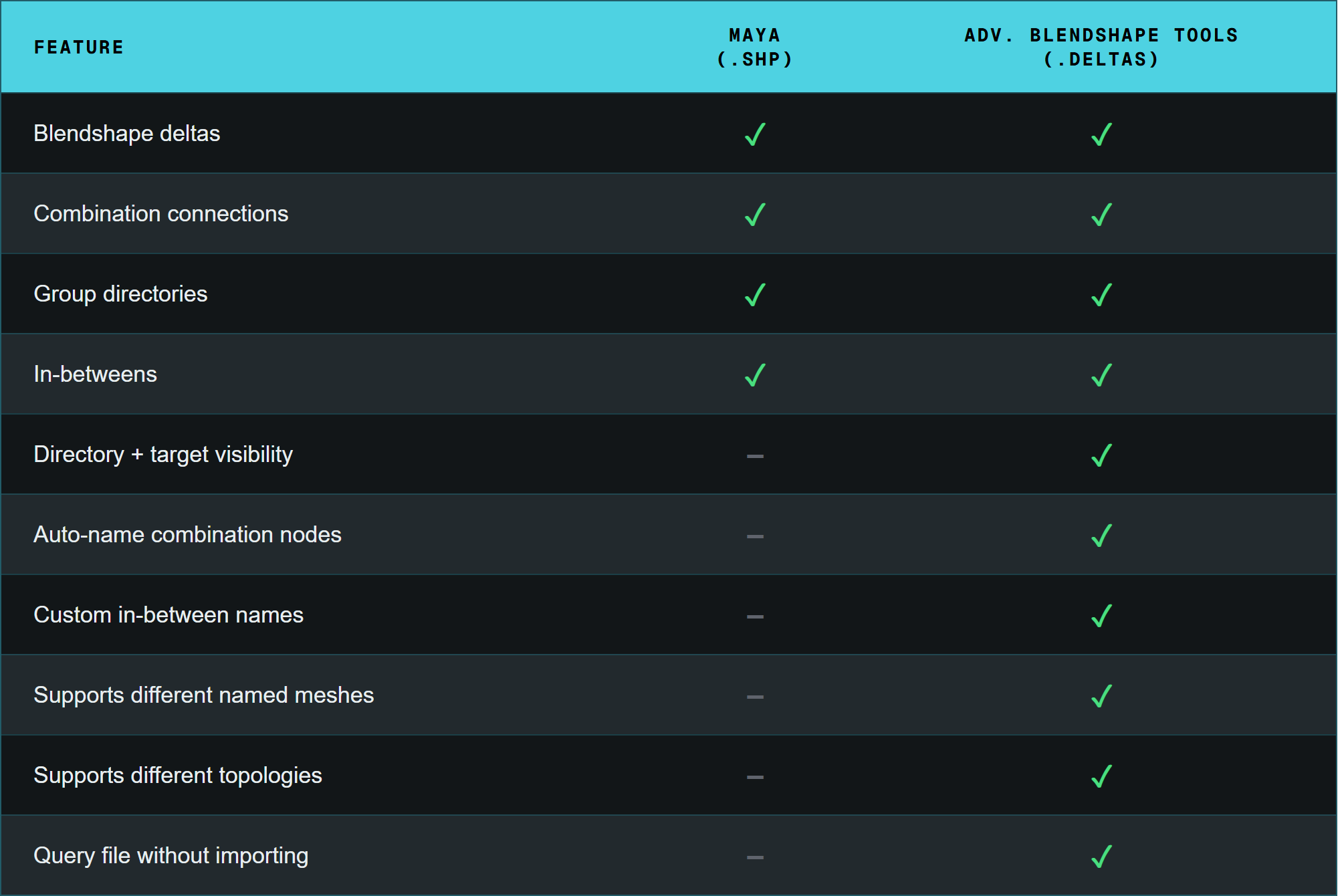
The plugin commands are a superset of Maya’s Shape Editor (SHP) format. The comparison below shows what’s supported.
Why Use It
Meshes change. Retopology, LOD generation, and design revisions would normally mean rebuilding blendShapes from scratch. Advanced Blendshape Tools transfers existing Blendshapes onto updated meshes using topology-independent interpolation.
Iterative design: Retopologize or redesign freely without losing sculpted shapes.
Asset updates: Push blendShapes to updated or optimized meshes (LODs, game targets) in one step.
Pipeline efficiency: Export, import, and transfer via commands or UI without custom pipeline code.
Cross-team handoffs: Keep blendShape data consistent through modeling, rigging, and animation.
Advantages
Topology-independent transfer: UV or spatial interpolation handles different vertex counts and topology.
Multiple methods: Choose UV, Topology, or Index interpolation based on your mesh relationship.
File-based and direct: Export to
.deltasfor asset management or transfer directly between nodes without intermediate files.Corrective support: Exports and transfers combination shapes, in-betweens, and custom target names.
SHP superset: Supports everything in Maya’s Shape Editor (SHP) format plus custom in-between names, visibility states, and auto-naming of combinationShape nodes.
Commands Overview
The plugin provides four main MEL/Python commands:
advBlendshapeExport: Export blendshape deltas to file.
advBlendshapeImport: Import blendshape deltas onto a target mesh.
advBlendshapeTransfer: Transfer blendshapes between meshes.
advBlendshapeFile: Query information from blendshape file.
See the Plugin Commands for detailed flag usage and examples.
Interpolation Methods
Scale your approach based on the geometric relationship between your source and target meshes:
1. UV Interpolation (-method "uv")
Interpolates deltas by UV proximity, finding the nearest vertices in UV space.
Best for: Different topologies with a shared UV layout (e.g. base mesh to LOD).
Requires: Non-overlapping UVs. Can produce discontinuities at UV seams.
2. Topology Interpolation (-method "topology")
Uses 3D surface distance and K-nearest-neighbor connectivity to interpolate deltas.
Best for: Different topologies where UVs are poor or absent, but meshes are geometrically close in 3D space.
Note: Artifacts may appear if source and target surfaces diverge significantly.
3. Index Match (-method "index")
Direct 1-to-1 transfer by vertex index.
Best for: Identical meshes where you need an exact copy with no interpolation.
Requires: Identical topology (vertex count and order).
Documentation
Documentation
- Installation
- UI Guide
- Export / Import
- Transfer
- Correspondence Groups
- Wrap Tool
- Batch Blendshapes
- Weights Tool
- Component Tool
- Plugin Commands
- Examples
- Example 1: Import onto a matching mesh (Index)
- Example 2: Transfer to a different-topology mesh (UV)
- Example 3: Production pipeline (export → query → import → transfer)
- Example 4: Import and transfer blendshape weight maps (
.bweights) - Example 5: Import and remap component selections (
.components) - Example 6: Bake through a live wrap (
advBlendshapeWrap)
- API Reference: blendshape_node
- API Reference: connections_node
- API Reference: commands