Transfer
The Transfer tab moves blendShape targets from a source node directly onto one or more target meshes without an intermediate file.
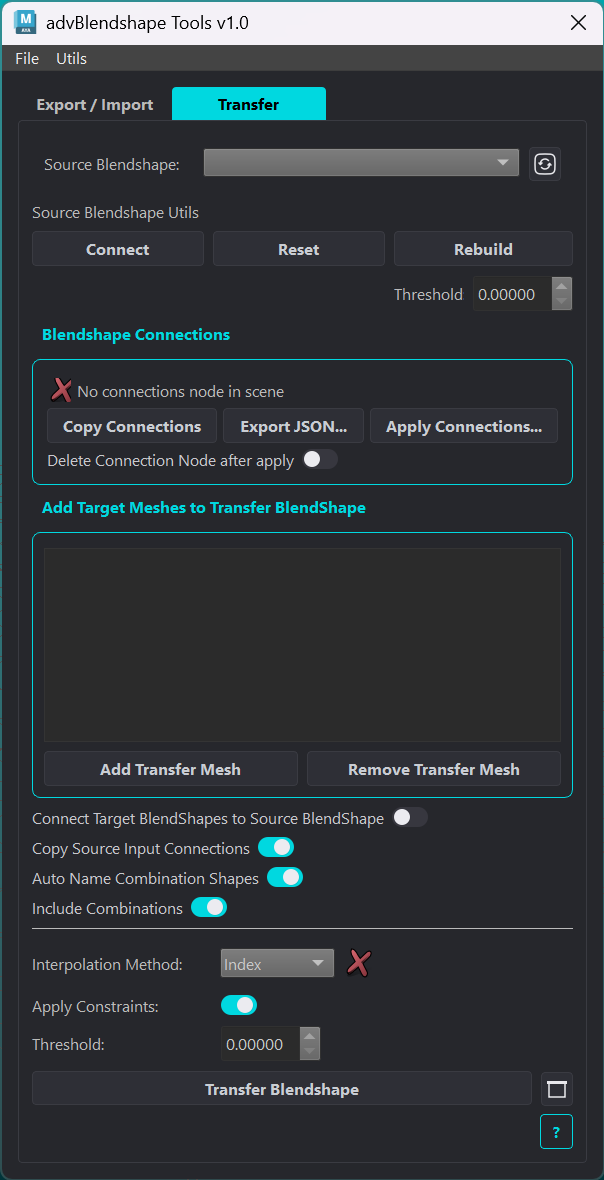
Source Selection
Element |
Description |
|---|---|
Source Blendshape |
Dropdown of all blendShape nodes in the scene. Select the node whose targets you want to transfer. |
Refresh |
Rescans the scene and repopulates the dropdown. Use after creating or renaming blendShape nodes. |
Connect |
Connects the weight attributes of all other blendShape nodes in the scene to the source node’s corresponding targets. |
Reset |
Resets the source blendShape weights. |
Rebuild |
Rebuilds the blendShape node via an export/import round-trip. Target order is preserved; index gaps and orphaned targets are removed. Combination shapes are separated from primary targets. |
Target Meshes
Element |
Description |
|---|---|
Target mesh list |
Meshes that will receive the transferred blendShapes. Supports multi-selection for removal. |
Add Transfer Mesh |
Adds currently selected mesh(es) to the target list. Duplicates are ignored. |
Remove Transfer Mesh |
Removes highlighted entries from the target list. |
Blendshape Connections
Records the Source Blendshape’s target input and output connections onto a scene node named abt_connections_node, so they can be rebuilt on a different blendShape after a mesh replacement. There is at most one connections node per scene.
The stored data is generic: it holds attribute names with their plugs and nothing about where it was captured from. On apply, the stored attribute name is concatenated onto each destination blendShape node, so any node with matching target names can receive it.
combinationShape plugs are skipped on both sides, whether they drive a target or are driven by one, since that network is rebuilt by the combination shape operations rather than restored from this data. Targets left with no connections at all are skipped too.
Element |
Description |
|---|---|
Status |
Green check with the stored attribute count when |
Copy Connections |
Captures the Source Blendshape’s target connections. Replaces any previous capture after a confirmation prompt. Nothing is disconnected from the source. |
Export JSON… |
Writes the stored connections to a |
Apply Connections… |
Opens a dialog to choose the data source, the scene node or a JSON file, and which blendShape nodes receive the connections. Every blendShape node in the scene is listed. |
Delete Connection Node after apply |
Deletes |
The apply summary reports how many connections were made, how many were already in place, how many were skipped, and how many failed, and points to the Script Editor when there was anything to report. The per-plug detail is written there. A skip means the destination blendShape has no target of that name, or a stored plug no longer resolves in the scene.
Applying to several blendShapes at once fans out the stored output connections: each destination tries to drive the same downstream plug, and the last one applied wins. Every overwrite is logged with both node names.
Transfer Options
Element |
Description |
|---|---|
Connect Target BlendShapes to Source BlendShape |
When enabled, the transferred blendShape target weights are connected from the source blendShape’s weights, so adjusting a weight on the source updates all targets. Mutually exclusive with Copy Source Input Connections. |
Copy Source Input Connections |
When enabled, any source target already driven by an incoming connection (an animation curve, a rig attribute) has that same connection copied onto the matching transferred target, so both blendShapes share the same driver instead of one chaining through the other. Targets driven by a |
Auto Name Combination Shapes |
Renames combination shape nodes to |
Include Combinations |
When enabled, combination shapes are transferred without their logic. Useful for driving weights from existing logic. |
Interpolation Method |
Algorithm used to map deltas from source to target meshes. See Interpolation Methods. |
Threshold |
Minimum delta magnitude to include. Targets with no deltas above this value are pruned. |
Apply Constraints |
When enabled, runs stored correspondence constraint groups after transfer to correct closure ratios. Only active for the Index method. |
Transfer Blendshape |
Runs the transfer to all listed target meshes. A summary dialog shows the created nodes and elapsed time on completion. |
Options button |
Opens the target selection dialog to choose specific targets from the source blendShape, rather than transferring all. |