Export / Import
The Export / Import tab is the primary file interface: it writes a blendShape node to a .deltas file and reads it back onto any target mesh using topology-independent interpolation.
Open it from the main window.
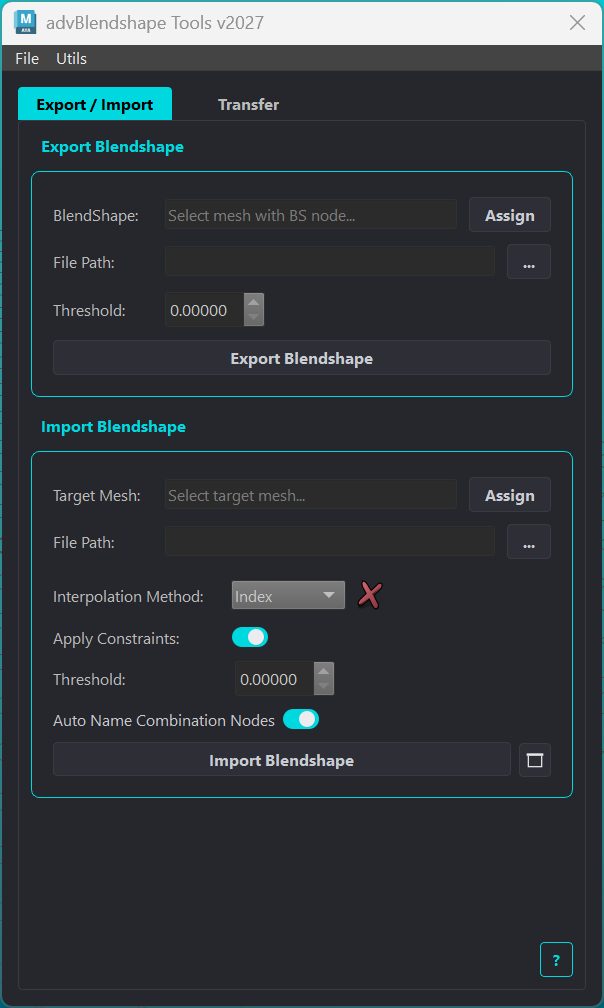
Export
The Adv Blendshape Export section saves delta data from a blendShape node to a .deltas file.
Element |
Description |
|---|---|
BlendShape |
Source blendShape node to export. Type a node name or click Assign to populate from the selected mesh. |
File Path |
Output |
Threshold |
Minimum vertex delta magnitude to include. Deltas below this value are treated as zero. Default: |
Export Blendshape |
Runs the export. All targets and combination shape data are written to the file. |
Import
The Adv Blendshape Import section reads a .deltas file and applies delta data onto a target mesh.
Element |
Description |
|---|---|
Target Mesh |
Mesh to receive the imported blendShapes. Click Assign to set from the current mesh selection. |
File Path |
Path to the |
Interpolation Method |
How vertex deltas are mapped from the file onto the target mesh. See Interpolation Methods. A status indicator shows whether the selected method is compatible with the current mesh and file. |
Threshold |
Minimum delta magnitude to keep during import. Targets with all deltas below this value are pruned. |
Auto Name Combination Shapes |
When enabled, imported combination shape nodes are renamed to |
Apply Constraints |
When enabled, runs stored correspondence constraint groups after interpolation to correct closure ratios. Only active for the Index method. Requires constraint groups authored on the blendShape node. |
Import Blendshape |
Runs the import using all targets in the file, or the subset configured via options. If the target mesh already has a blendShape node, new targets are added into it. |
Options button |
Opens the Import Options dialog to select specific targets to import. |
Import Options Dialog
Lets you select a subset of targets to import from the file.
Element |
Description |
|---|---|
Select All / Deselect All |
Check or uncheck all targets. |
Toggle Selected |
Flips the check state of highlighted items. Use Ctrl+click or Shift+click to highlight multiple items first. |
Target list |
Every target found in the file, each with a checkbox. Unchecked targets are skipped. |
Import Blendshape |
Accepts the selection and immediately runs the import with the checked targets only. |