Wrap Tool
The advBlendshape Wrap Tool live-binds a target mesh to a source mesh’s deformation, then bakes the source blendShape’s targets onto that target mesh as a new blendShape node.
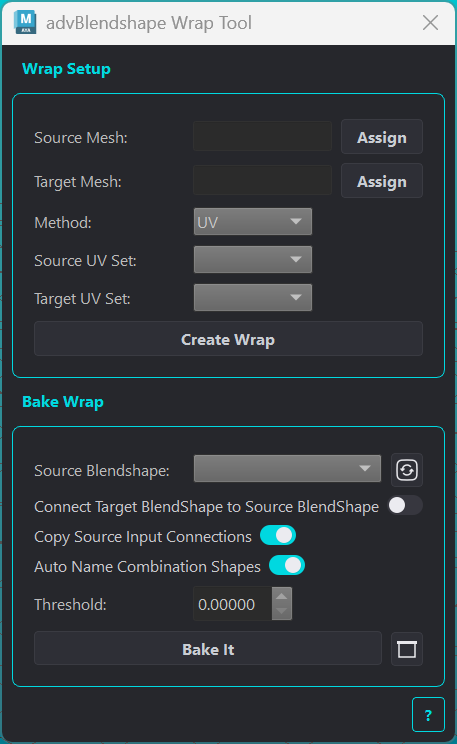
The advBlendshapeWrap node has 2 modes; UV and Topology. The UV method drives a target mesh by the source mesh using the UV layout for correspondense mapping. With the Topology method, this uses a proximity based binding between the source and target mesh.
Wrap Setup
Creates an advBlendshapeWrap deformer on the target mesh, driven live by the source mesh.
Element |
Description |
|---|---|
Source Mesh / Assign |
Mesh whose live deformation drives the wrap. Assign takes the first selected transform. |
Target Mesh / Assign |
Mesh to receive the wrap deformer. Assign takes the first selected transform. |
Method |
UV maps source-to-target by UV proximity. Topology maps by 3D surface distance and nearest-neighbor connectivity. |
Source UV Set / Target UV Set |
UV method only. UV set used on each mesh for the correspondence lookup. |
Max Drop-off Distance |
Topology method only. Maximum world-space distance a source vertex can influence a target vertex. |
Create Wrap |
Creates the |
The deformer’s Envelope attribute is paintable per-vertex from the Attribute Editor’s Paint Weights Tool, letting you mask off areas of the target mesh that shouldn’t follow the source.
Bake
Bakes the source blendShape’s targets onto the wrapped target mesh, producing a new blendShape node on a {targetMeshName}__custom duplicate.
Each source target is activated at weight 1.0, the live-wrapped pose of the target mesh is captured as a duplicate, and a new blendShape is built from those snapshots. Combination shapes are rebuilt from the baked primary targets rather than baked directly.
Element |
Description |
|---|---|
Source Blendshape |
Dropdown of all blendShape nodes in the scene to bake from. Click the refresh icon to rescan. |
Connect Target BlendShape to Source BlendShape |
When enabled, the new blendShape’s target weights are connected from the source blendShape’s weights, so the source continues to drive both. Mutually exclusive with Copy Source Input Connections. |
Copy Source Input Connections |
When enabled, any source target already driven by an incoming connection (an animation curve, a rig attribute) has that same connection copied onto the matching new target, so both blendShapes share the same driver instead of one chaining through the other. Targets driven by a |
Auto Name Combination Shapes |
Renames rebuilt combination shape nodes to |
Bake It |
Runs the bake onto the assigned target mesh. |
Options button |
Opens the target selection dialog to bake specific targets instead of all of them. |
Both connection toggles can be switched off if you don’t want the new blendShape’s targets connected to anything.