Weights Tool
The advBlendshape Weights Tool manages painted blendShape weight maps as .bweights files. Open it from the AWT shelf button.
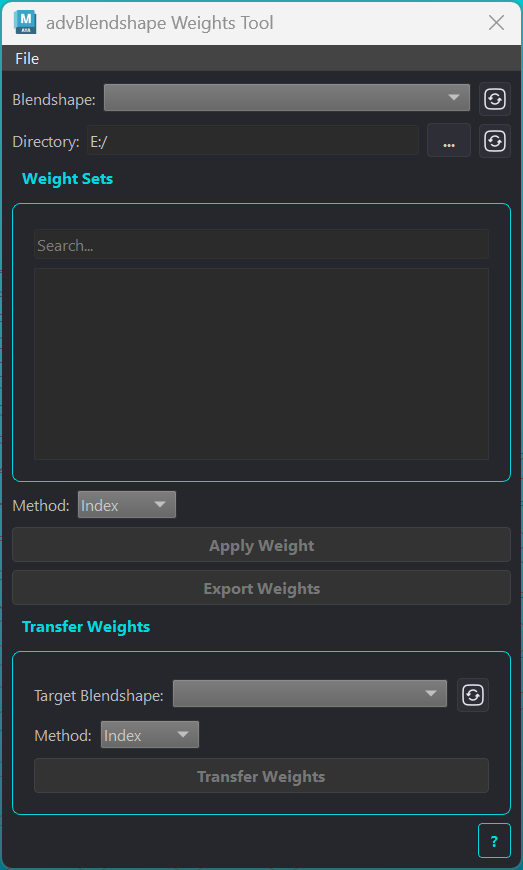
Painted weight maps (split masks like front, right, mouth) normally live on a single blendShape node and require repainting for every new mesh. This tool saves them to disk as a reusable library, applies them to any blendShape node in the scene, and can transfer them directly between blendShape nodes whose meshes differ in topology.
Source and Library
Element |
Description |
|---|---|
Blendshape |
Dropdown of all blendShape nodes in the scene. Weights are applied to or exported from this node. Click the refresh icon to rescan. |
Directory |
Folder containing |
Search |
Filters the weight set list by name. |
Weight Sets list |
One entry per |
Method |
How weights are mapped onto the blendShape’s base mesh: Index, UV, or Topology. The status icon shows compatibility. Index requires an exact vertex count match; hover for vertex counts. |
Apply Weight |
Applies the selected weight set to the chosen blendShape node using the selected method. |
Export Weights |
Saves the chosen blendShape node’s weights to a |
Transfer
Transfers weights directly from the source blendShape node to another blendShape node, without an intermediate file.
Element |
Description |
|---|---|
Target Blendshape |
The blendShape node to receive the weights. The source node is excluded from the list. Click the refresh icon to rescan. |
Method |
Mapping method between the source and target base meshes. The status icon shows compatibility. Index requires matching vertex counts. |
Transfer Weights |
Runs the transfer. Disabled until the selected method is compatible. |
Batch Weights
Batch operations are available from the File menu in the Weights Tool.
Batch Export Weights
Exports weight maps for multiple blendShape nodes to .bweights files in a single directory.
Element |
Description |
|---|---|
Directory |
Output folder for all |
Node list |
All blendShape nodes found in the scene, one per row. Check or uncheck rows to include or exclude them. |
All / None |
Check or uncheck all rows at once. |
Export Files |
Exports all checked nodes. |
Batch Import Weights
Imports weight maps from .bweights files onto matching blendShape nodes.
Element |
Description |
|---|---|
Directory |
Folder to scan for |
Entry list |
One row per |
Interpolation Method |
Per-entry method. Index requires matching vertex counts. The status icon confirms compatibility. |
Import Files |
Runs the import for all entries. |